


[This post has also been cross-posted on building a new box, my blog on school reform.]
I've recently begun a three-class course to receive an add-on endorsement to my teaching certificate in Online Learning. In my position as an instructional technology specialist - and in a desire to be able to teach online myself - I thought it was an important move.
Only a month into the first course, I'm finding that the anticipation is that it will be a very metacognitive course. After all, the first course is Introduction to Virtual Learning Environments - taught in a virtual learning environment. The courses are entirely online with no face-to-face (albeit I'm taking the course with a handful of teachers that are at my school, which allows us some interaction not normally present in an online course). This brings two things to mind.
The first is whether the course (or courses) will meet their own expectations. On the surface, I'm sure they will. As the audience for the course is educators who are already exposed to a high degree of technology (including Angel Learning, the course management system used throughout my district and to deliver these endorsement courses), it's not as if entirely new content is being delivered - in this case, the course differs greatly from, for example, an online physics course for a student who has not had physics before. I'm hoping that the current course reflects a very different model of teaching and learning, which leads into my second thought.
That second thought (hold on tight - it's much broader than the first) is that online learning is as different from traditional classroom learning as the computer is from the pencil and paper - and the methods by which online learning are implemented and built need to be just as different. When the computer was first introduced into the classroom over two decades ago, it was frequently used as little more than a drill instructor - repetitive practice was simply transferred from paper and pencil to the computer. Teachers - particularly younger teachers who were more connected to the blossoming Information Age - had an idea that it could be a revolutionary classroom tool; they just didn't quite know what to do with it yet. Now that computers are found in almost every classroom - in many cases, multiple computers and computing devices - the use of those computers looks incredibly different than it did all those years ago. (I was going to use the phrase the classroom of today instead of the use of those computers, but the fact is, it doesn't. That's a topic for another post...)
Online learning has the potential to take that same step - potential, I say. I'm not sure it's done that way very much in current online learning classes. A colleague of mine is working on a Master's degree of Instructional Technology from the University of Georgia, and there is a significant online component to it. However, he continually laments that the online course is poorly constructed and a joke - he frequently logs on, and goes about other business while the traditional classroom element of a lecturing professor is replaced with a video of a lecturing professor. It pains me to hear this, because this is a course in training other educators to use that same technology - and it becomes a vicious cycle. Fortunately, my colleague knows it's a poor example - or more accurately, an example of what not to do - but it still, I think, is representative of a typical online learning environment: one in which the traditional classroom has been replicated as much as possible.
The online learning environment is the Wild West of education - some pioneers are starting to venture out into it, and are figuring out how best to tame the land, but overall settlers are still trying to bring the comforts of home with them to this new land. That environment, however, appeals to and suits an entirely different type of learner. Lisa Nielsen over at The Innovative Educator has a post on 10 Reasons Students Say They Prefer Learning Online, as well as an introductory guide to online learning. Included in that post is a graphic map of issues and considerations for using and implementing :
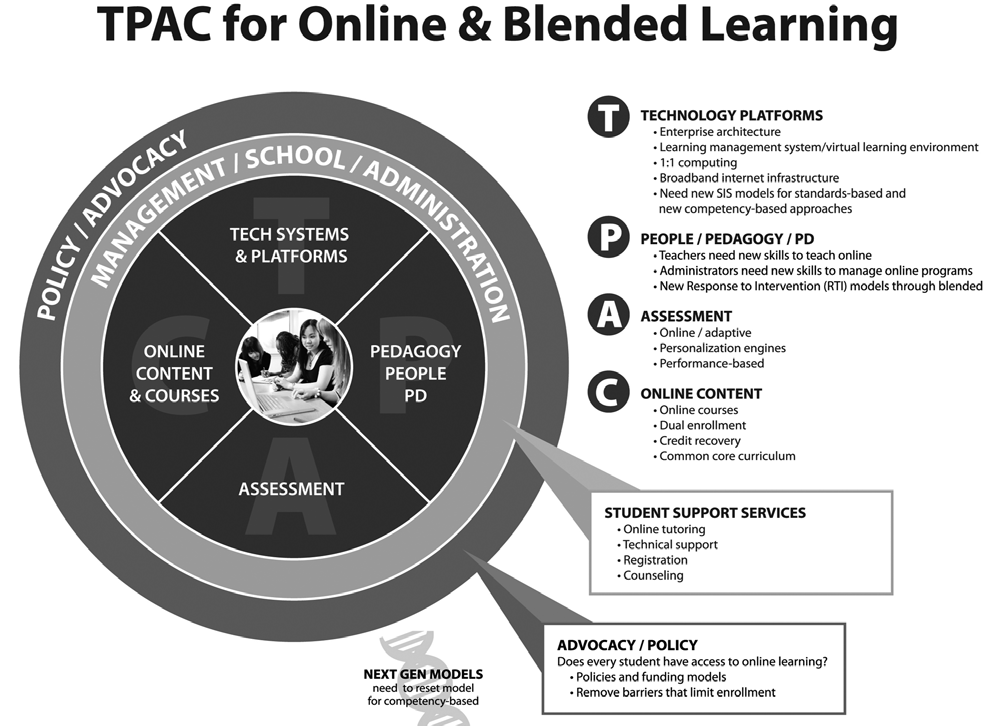
The most interesting this I find about this map is the note about next generation models of online learning, and how they need to reset the model to focus on competency-based learning. See it? The small DNA-like graphic tucked into the bottom of the diagram? I think that's a significant part of the problem with online learning - the notion that the method of teaching in an online learning environment is so different from traditional classroom teaching that it's considered "where we're going next." Unfortunately, like so many things in education, if we wait to go there next, we may never get there because where we are now will be so entrenched in the system that it'll be acceptable as the way things should be done.
If you are an online learning pioneer in some way - an online teacher, a district official overseeing or implementing online learning, a content developer writing content for an online environment, and so on - recognize that this is a radically different learning environment, and as a result the same old way of doing things no longer works. You have to find ways to engage your students when they're self-directed. You have to create authentic, relevant, honest assignments that will benefit your students - they will get something out of it besides learning how to quickly finish it. You have to use the interactive tools of your learning management system to provide students authentic feedback. Don't be afraid to try something new, maybe something not tested yet by lots of folks - there's a learning experience both for you and for the online students in analyzing why a certain type of activity didn't work - that in itself will be an important skill for students who are graduating from our institutions. All of this takes time and energy, yes - but does it take any more time and energy than that first year you were a teacher and had to create all of your traditional classroom materials and lessons yourself?
Let's go, folks - hitch up the wagons and head West, while you still have time to shape the frontier in the way you want. Otherwise, all the land will be taken by folks who do the same thing as back East - and it won't look any different, and it won't move us forward.
I've recently begun a three-class course to receive an add-on endorsement to my teaching certificate in Online Learning. In my position as an instructional technology specialist - and in a desire to be able to teach online myself - I thought it was an important move.
Only a month into the first course, I'm finding that the anticipation is that it will be a very metacognitive course. After all, the first course is Introduction to Virtual Learning Environments - taught in a virtual learning environment. The courses are entirely online with no face-to-face (albeit I'm taking the course with a handful of teachers that are at my school, which allows us some interaction not normally present in an online course). This brings two things to mind.
The first is whether the course (or courses) will meet their own expectations. On the surface, I'm sure they will. As the audience for the course is educators who are already exposed to a high degree of technology (including Angel Learning, the course management system used throughout my district and to deliver these endorsement courses), it's not as if entirely new content is being delivered - in this case, the course differs greatly from, for example, an online physics course for a student who has not had physics before. I'm hoping that the current course reflects a very different model of teaching and learning, which leads into my second thought.
That second thought (hold on tight - it's much broader than the first) is that online learning is as different from traditional classroom learning as the computer is from the pencil and paper - and the methods by which online learning are implemented and built need to be just as different. When the computer was first introduced into the classroom over two decades ago, it was frequently used as little more than a drill instructor - repetitive practice was simply transferred from paper and pencil to the computer. Teachers - particularly younger teachers who were more connected to the blossoming Information Age - had an idea that it could be a revolutionary classroom tool; they just didn't quite know what to do with it yet. Now that computers are found in almost every classroom - in many cases, multiple computers and computing devices - the use of those computers looks incredibly different than it did all those years ago. (I was going to use the phrase the classroom of today instead of the use of those computers, but the fact is, it doesn't. That's a topic for another post...)
Online learning has the potential to take that same step - potential, I say. I'm not sure it's done that way very much in current online learning classes. A colleague of mine is working on a Master's degree of Instructional Technology from the University of Georgia, and there is a significant online component to it. However, he continually laments that the online course is poorly constructed and a joke - he frequently logs on, and goes about other business while the traditional classroom element of a lecturing professor is replaced with a video of a lecturing professor. It pains me to hear this, because this is a course in training other educators to use that same technology - and it becomes a vicious cycle. Fortunately, my colleague knows it's a poor example - or more accurately, an example of what not to do - but it still, I think, is representative of a typical online learning environment: one in which the traditional classroom has been replicated as much as possible.
The online learning environment is the Wild West of education - some pioneers are starting to venture out into it, and are figuring out how best to tame the land, but overall settlers are still trying to bring the comforts of home with them to this new land. That environment, however, appeals to and suits an entirely different type of learner. Lisa Nielsen over at The Innovative Educator has a post on 10 Reasons Students Say They Prefer Learning Online, as well as an introductory guide to online learning. Included in that post is a graphic map of issues and considerations for using and implementing :
The most interesting this I find about this map is the note about next generation models of online learning, and how they need to reset the model to focus on competency-based learning. See it? The small DNA-like graphic tucked into the bottom of the diagram? I think that's a significant part of the problem with online learning - the notion that the method of teaching in an online learning environment is so different from traditional classroom teaching that it's considered "where we're going next." Unfortunately, like so many things in education, if we wait to go there next, we may never get there because where we are now will be so entrenched in the system that it'll be acceptable as the way things should be done.
If you are an online learning pioneer in some way - an online teacher, a district official overseeing or implementing online learning, a content developer writing content for an online environment, and so on - recognize that this is a radically different learning environment, and as a result the same old way of doing things no longer works. You have to find ways to engage your students when they're self-directed. You have to create authentic, relevant, honest assignments that will benefit your students - they will get something out of it besides learning how to quickly finish it. You have to use the interactive tools of your learning management system to provide students authentic feedback. Don't be afraid to try something new, maybe something not tested yet by lots of folks - there's a learning experience both for you and for the online students in analyzing why a certain type of activity didn't work - that in itself will be an important skill for students who are graduating from our institutions. All of this takes time and energy, yes - but does it take any more time and energy than that first year you were a teacher and had to create all of your traditional classroom materials and lessons yourself?
Let's go, folks - hitch up the wagons and head West, while you still have time to shape the frontier in the way you want. Otherwise, all the land will be taken by folks who do the same thing as back East - and it won't look any different, and it won't move us forward.


 Posts
Posts


