Whiteboards

Just a new way to conduct old-fashioned teaching?

Net Neutrality and Education

Why does it matter?

11.21.2010

Online Learning - The Wild West of Education

[This post has also been cross-posted on building a new box, my blog on school reform.]


I've recently begun a three-class course to receive an add-on endorsement to my teaching certificate in Online Learning. In my position as an instructional technology specialist - and in a desire to be able to teach online myself - I thought it was an important move.


Only a month into the first course, I'm finding that the anticipation is that it will be a very metacognitive course. After all, the first course is Introduction to Virtual Learning Environments - taught in a virtual learning environment. The courses are entirely online with no face-to-face (albeit I'm taking the course with a handful of teachers that are at my school, which allows us some interaction not normally present in an online course). This brings two things to mind.


The first is whether the course (or courses) will meet their own expectations. On the surface, I'm sure they will. As the audience for the course is educators who are already exposed to a high degree of technology (including Angel Learning, the course management system used throughout my district and to deliver these endorsement courses), it's not as if entirely new content is being delivered - in this case, the course differs greatly from, for example, an online physics course for a student who has not had physics before. I'm hoping that the current course reflects a very different model of teaching and learning, which leads into my second thought.


That second thought (hold on tight - it's much broader than the first) is that online learning is as different from traditional classroom learning as the computer is from the pencil and paper - and the methods by which online learning are implemented and built need to be just as different. When the computer was first introduced into the classroom over two decades ago, it was frequently used as little more than a drill instructor - repetitive practice was simply transferred from paper and pencil to the computer. Teachers - particularly younger teachers who were more connected to the blossoming Information Age - had an idea that it could be a revolutionary classroom tool; they just didn't quite know what to do with it yet. Now that computers are found in almost every classroom - in many cases, multiple computers and computing devices - the use of those computers looks incredibly different than it did all those years ago. (I was going to use the phrase the classroom of today instead of the use of those computers, but the fact is, it doesn't. That's a topic for another post...)


Online learning has the potential to take that same step - potential, I say. I'm not sure it's done that way very much in current online learning classes. A colleague of mine is working on a Master's degree of Instructional Technology from the University of Georgia, and there is a significant online component to it. However, he continually laments that the online course is poorly constructed and a joke - he frequently logs on, and goes about other business while the traditional classroom element of a lecturing professor is replaced with a video of a lecturing professor. It pains me to hear this, because this is a course in training other educators to use that same technology - and it becomes a vicious cycle. Fortunately, my colleague knows it's a poor example - or more accurately, an example of what not to do - but it still, I think, is representative of a typical online learning environment: one in which the traditional classroom has been replicated as much as possible.


The online learning environment is the Wild West of education - some pioneers are starting to venture out into it, and are figuring out how best to tame the land, but overall settlers are still trying to bring the comforts of home with them to this new land. That environment, however, appeals to and suits an entirely different type of learner. Lisa Nielsen over at The Innovative Educator has a post on 10 Reasons Students Say They Prefer Learning Online, as well as an introductory guide to online learning. Included in that post is a graphic map of issues and considerations for using and implementing :
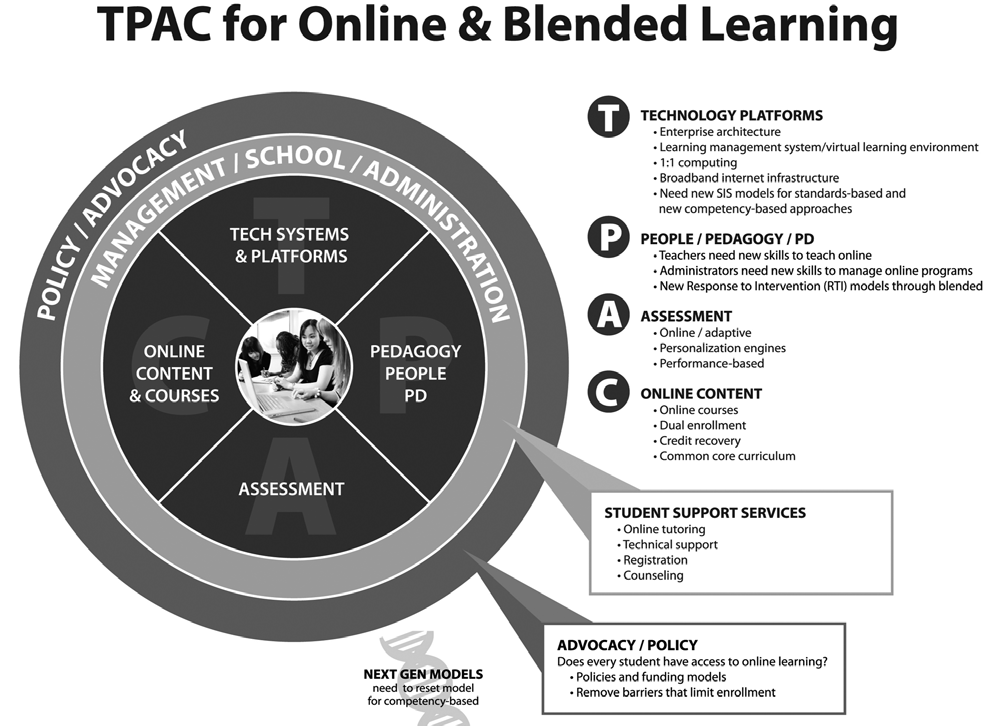


The most interesting this I find about this map is the note about next generation models of online learning, and how they need to reset the model to focus on competency-based learning. See it? The small DNA-like graphic tucked into the bottom of the diagram? I think that's a significant part of the problem with online learning - the notion that the method of teaching in an online learning environment is so different from traditional classroom teaching that it's considered "where we're going next." Unfortunately, like so many things in education, if we wait to go there next, we may never get there because where we are now will be so entrenched in the system that it'll be acceptable as the way things should be done.


If you are an online learning pioneer in some way - an online teacher, a district official overseeing or implementing online learning, a content developer writing content for an online environment, and so on - recognize that this is a radically different learning environment, and as a result the same old way of doing things  no longer works. You have to find ways to engage your students when they're self-directed. You have to create authentic, relevant, honest assignments that will benefit your students - they will get something out of it besides learning how to quickly finish it. You have to use the interactive tools of your learning management system to provide students authentic feedback. Don't be afraid to try something new, maybe something not tested yet by lots of folks - there's a learning experience both for you and for the online students in analyzing why a certain type of activity didn't work - that in itself will be an important skill for students who are graduating from our institutions. All of this takes time and energy, yes - but does it take any more time and energy than that first year you were a teacher and had to create all of your traditional classroom materials and lessons yourself? 


Let's go, folks - hitch up the wagons and head West, while you still have time to shape the frontier in the way you want. Otherwise, all the land will be taken by folks who do the same thing as back East - and it won't look any different, and it won't move us forward.

11.07.2010

The Geopolitics of URL Shorteners

Just a couple of days ago, I had a "well, duh" moment that I hadn't really thought through, regarding the use of URL shorteners and their domains.

A URL shortener is a site where you can take a long URL that's not very easy to remember - such as http://www.theresagreatsiteyouhavetosee.com/and-the-page-is/in-a-directory/andheresthepage.html - and shorten it to something more manageble, like http://sho.rt/url. The URL shortening service simply redirects visitors to your original link, and many services also include tracking and statistics tools.

One of the most popular is http://bit.ly, mainly because it is easily integrated with Twitter. You can shorten a URL and send it out via Twitter all at once. Another service is http://ow.ly. Both feature extremely short URLs, and create their short URLs using 4-6 alphanumeric characters.

What I was aware of with these sites - but didn't really think about - was the top-level domain. Top-level domains ("TLD") are the part after the last dot in the overall domain, and tell you what type of site you are visiting. The most well-known TLD's are .com, .org, and .net, which are intended to indicate a commercial, organizational, and network site respectively. In addition, there is .edu (indicating an educational site, reserved exclusively for higher institutions), .gov (governmental sites), and .mil (military establishment sites) - all three of these are closely governed. (Whereas any user can register a .com, .org, or .net domain, such is not the case with those three; they are internally distributed.)

The three-character domains are certainly not the only ones - some newer TLD's with four or more characters like .mobi, .info, and .name have come into use in the last few years. The other TLD set that have been around since the beginning are county codes. For example, sites that end in .us are United States organizations. (Sometimes these are subdivided further, for example many school systems use .k12.XX.us, where XX is their state abbreviation.) Other country codes are .uk for Great Britian, .ru for Russia, .ca for Canada, .au for Australia, and so forth. (Wikipedia has an article listing almost all of the top-level domains, country-based or otherwise.

The whole point of this post is this notion of country code TLD's - particularly, using them for something that's not country-specific. Some country codes have become desirable of late because of their potential use in creating easily-remembered URLs. For example, Columbia's .co is a possible alternative to .com, as both could stand for company. Another well-known domain (but not necessarily the country) is .tv, which belongs to the country of the islands of Tuvalu. (Do you know where they are? I had to look them up.)

In the case of my previously-used URL shorteners, they use the TLD of .ly, which is Libya. With many more services trying to capitalize on the adverb-conjuring .ly domain, Libya has now begun to crack down on registrations and activities of those sites - it has disabled some services which it claims is in violation of religious law.

Another URL shortener service that I was recently introduced to is http://goo.gl - Google's service. The one thing I don't like about it (as compared to my previously-used bit.ly) is that you can't create customized shortened URLs - you must use the 5-character string Google creates for your link.

But as its domain is based in the much more stable Greenland, it might still be a wise switch.

What I Learned @ GaETC 2010

This week, the Georgia Educational Technology Conference wrapped up. I was able to attend for the first time in several years, and learned a few things:
  1. I really enjoy conferences. It's a chance to meet a variety of people, and learn from them, whether it's listening to them present, participating in discussions during sessions and workshops, or even "coffee pot" conversations. If you have the opportunity, I recommend you attend - whether it's a more general conference like GaETC or a more discipline-specific one, it's an opportunity to learn a lot.
  2. I really enjoy presenting at conferences. I gave two sessions this year: one on Bring Your Own Technology (which I've written about before), and issues with students and teachers interacting on Facebook. Both were fairly well-attended and, I think, successful. The conference provided session-specific feedback websites, but I have not yet received information about what people submitted for mine.
  3. I'm a big fan of Patrick Crispen - as is everybody else. If you've never heard Patrick speak, you should. He's a professor of education at the University of Southern California, and has been a regular GaETC guest for the past several years. He's engaging and knowledgeable, and popular, as judging by the number of his concurrent sessions that were at capacity.
    Check out his website, NetSquirrel.
  4. Conference locations need to accommodate their clientele. Ironically, the biggest problem that many thought was that the wireless connectivity was somewhat unreliable. This is one conference which it could be assumed that every attendee would have some internet-capable device, and would be expecting to use it. The wireless connection also affected several presentations, and some presenters had exclusively online content which, needless to say, made their presentations difficult.
There were some specific technology ideas that I also learned, but I thought I'd save those for another post (or several).

10.09.2010

Online Conferences

For those searching for some professional development, but don't have the funds to travel, there are two online educator conferences that will be starting up.

Global Education Conference - November 15-19, 2010
http://www.globaleducationconference.com
Twitter: @globaledcon, hashtag #GlobalEd10
Global Education Conference Facebook page


The Global Education Conference, kicking off its inaugural year, is designed to be collaborative and world-wide community effort to provide opportunities and instruction in globally-connected education activities and initiatives. As they clarify on their site, it is not simply a global conference on general education topics. The emphasis is on globally-connected education - ways to stretch your teaching and learning outside of the classroom and around the globe.

The conference will have sessions presented 24 hours a day - live events are scheduled according to the presenter's local day and timezone; all sessions will be recorded for on-demand playback at another time. The conference will also have sessions in multiple languages.

More about the actual sessions offered will be forthcoming - presentation applications are being accepted through the end of October.

K12 Online Conference - October 18-29, 2010
http://k12onlineconference.org
Twitter: hashtag #k12online10
K12 Online Conference Facebook page

The K12 Online Conference, online since 2006, is a two-week online conference covering a wide array of general education topics, usually with particular focus on integrating emerging technologies. There is no charge for the conference, and it is open to anyone to attend or to present. The conference uses several different platforms to disseminate information: a blog for news and announcements, a wiki for conference guidelines, and a Ning network for the actual conference content.

Online conferences, you say? As far as professional development goes, it's a bit of a foreign concept to some:

  • I think most schools like to keep training in-house to tailor it to their local needs.
  • The educators who would be most likely to attend a conference virtually would be those early-adopters and technology-savvy teachers who might also be less likely to actually need it.
  • So many teachers are comfortable with the face-to-face nature of current offerings that the online delivery method takes some getting used to - it doesn't feel legitimate.
  • It may also actually not be seen as legitimate in the eyes of administrators - how can you track how much someone is participating in an online conference?
Between the economy, the continuing increase of technology in schools, and the increasing nature of educators needing to be more "global" in scope, online conferences will start to gain more popularity over the next decade - hopefully sooner. Many school systems should have measures in place to allow teachers to document their own learning in settings outside of official system-delivered professional development, and these types of conferences are perfect for that. (The K12 Online Conference site even has a section of its wiki to help walk educators through that process.)

Check out one or both of the conferences. They're free, they're online, and they're accessible anywhere and anytime.

10.07.2010

Building a New Box

Over the past couple of weeks - I think probably starting with the news that the NBC networks were going to launch their Education Nation initiative - the idea of school reform has been on my mind a lot. I've had water-cooler conversations with several teachers which drifted into the realm of "what's-wrong-and-what-would-work" and a couple of articles have come through my inbox along the same vein.

So I decided to start blogging about that, too. Building a New Box is my new school reform blog - not so much an authority on the matter, but simply collecting information and opinions from various sources, and providing some of my own.

The title? Well, you've probably heard the phrase thinking outside the box. But what happens if just being outside the box isn't enough? What if you need a completely new box?

I'm only two posts into it, but please add it to your RSS reader and stay tuned - I'm hoping it'll be part of the larger discussion about education reform in this country.

9.26.2010

Good Morning Class, I'm Mr. Friend

As so many things do, this post started because of a question from my wife.

"So, have you unfriended your students on Facebook yet?"

I simply replied with, "Nope," and proceeded to quietly let her tell me why I needed to do so. A parent could see something on their child's Facebook page that they received through my page that was in fact posted by someone else, and I'm caught in the middle. Someone could post an inappropriate picture, tagging me, a colleague, or even a student. A student could begin an inappropriate conversation, and it's there for all the world to see. Perhaps we don't want all of our personal photos and information available to students and friends of students.

I don't completely disagree with her - all of her points are completely valid. Certainly, in this more litigious world than the one I grew up in, there's a potential lawsuit lurking in the most innocent of places. And yet, I still don't agree it's necessary to do. And, honestly, I'm trying to get a handle on why.

Several teachers at my school are on Facebook, and are not only friends with me, but with students as well - both former students and current. I myself friended several students who are part of the improvisational performance troupe for which I'm a sponsor. Initially I had to do it because emails I sent to them went unanswered - they were on Facebook regularly, but rarely checked email.

Social media has raised the question of teachers' professional lives vs. private lives to a whole new level of debate - for example, this article from the Washington Post discusses teachers' personal activities (such as drinking or their dating habits) being seen by the students they serve. Does this differ in principle to a student seeing a teacher out in public, at a bar or on a date? And Wired featured an article earlier this year discussing the creation of fake teacher or faculty profiles by disgruntled students - certainly an easy, wide-spread way to raise doubts about a teacher's or administrator's character. How much say should a school system have over the content of its staff's social media pages? One Georgia teacher was encouraged to resign over her Facebook profiles.

Certainly there are cases where Facebook was detrimental to a teacher's career. It seems to me that instances like these are not necessarily the norm - but the question is, is the risk of negative consequences outweighed by the benefits?

Facebook has a post on their blog from September 2009 with tips for teachers creating profiles on Facebook. And the National Middle School Association has a Facebook discussion board with a topic of whether teachers should friend students on Facebook. There are ways that educators can use Facebook safely - even having interaction with students. Over the next month or so, I'm delving into the topic more.

If you're reading this post, I'd like to get your feedback - what is the proper etiquette for students and teachers on Facebook and other social networking sites? I'll be presenting this same topic at the Georgia Educational Technology Conference in November, so if you share some good information, I'll be sure to credit you! Share it in a comment below, or visit my newly-created techieteacher Facebook page (it seemed only fitting) and leave a post on the Wall or in the Discussion Boards.

8.07.2010

In the clouds vs. in the trenches... A Vision of Technology

I really like my position as Instructional Technology Specialist for two reasons:

  1. It lets me think in the clouds about some bigger-picture educational technology issues that most classroom teachers don't have time for; and
  2. It lets me stay somewhat in the trenches with teachers by developing effective teaching and learning tools in collaboration with them.
As our school year prepares to take off full-steam (our students return in two days), I've been busy working with teachers during pre-planning to get things ready for the students' return. Much of that has been the simple, in-the-trenches stuff like making sure printers are installed, trouble-shooting issues with our new teacher laptops, making sure all appropriate user accounts are set up, etc. At the same time, I've had floating around in my head the in-the-clouds concept of a technology vision.

I guess I'd say that I'm not proud of the fact that this is my fourth year at this school in this position - the second year doing it solo - and I still do not have a fully-rendered vision of technology for the school. It's one of those things that is in my head, and if hard-pressed I might be able to tell you some of the elements, but I think in order to be fully effective at what I do, the vision needs to crystallize.

What are some elements that need to be present in a K-12 technology vision statement that can satisfy both ends of the spectrum - the in-the-clouds ideas of what educational technology lends to the "big picture," and the in-the-trenches needs and intentions of the teachers using that technology with students?

7.25.2010

Bring Your Own Technology

Well, one would think that having a summer vacation would allow one time to catch up on one's lack of blogging.


Apparently, one would be wrong.

I'm heading back to school tomorrow, and while it was nice to have a break, I think I'm ready to get back to work. One of the things I'm hoping to focus on this year is emphasizing 21st century skills. Yeah, yeah - every educator on the blogosphere talks about those, so let me explain.

Our county has plenty of technology (which I've talked about before), but often our teachers fall into the pitfall of using it themselves. The worst offender is each classroom's interactive white board (as I've also talked about before); it can be challenging, however, to get more student-hands-on time on the board, especially in small, cramped classrooms. We have laptop carts for teachers to use (plus several general-use computer labs), and starting this year we have an additional twenty smaller-profile netbooks for teachers to check out for student use. We have document cameras and whiteboard tablets that teachers can use as well.

Unfortunately, behind all this technology still lies the tendency towards a teacher-centered classroom. In order to make some real progress with students - in order to really teach them 21st century skills - teachers have to get the goods more into the hands of the students.

This year, we might be able to make some progress with our county's new initiative, BYOT - Bring Your Own Technology. This opens the gates for students to bring in their own laptops, netbooks, internet-capable phones, etc. A variety of thoughts on this:

  • A large number of our teachers are wary of this, because of the management aspect - how do you keep students on-task when they're now allowed to bring in items that were previously forbidden in the classroom. For example, last year, students would have to surreptitiously text message on their phones, hidden out of the teacher's sight - now, if they're allowed to have them in class, how do we make sure that they're staying on task and not texting?
    The answer is all in the classroom management. Yes, teachers will need to be more vigilant of what students are doing with their technology. That means that they'll most likely need to be more specific and more targeted towards what the students are being asked to do.
  • When using standard school laptops, teachers could be sure of what standard software was installed on them. Now, if students are using their own computers (older or newer machines, Windows or Mac machines, etc.) or even their phones (iPhones, Android phones, etc.), how can we be sure they have the same software?
    The simple answer is that teachers will need to move away from software-specific assignments - everyone will create a PowerPoint - and towards more skill-specific assignments - everyone will create a presentation. By opening up their standards for the format of the finished product, they allow students to be more creative and can focus more on the content.
  • So many more types of technology can be expected to create more technical problems - connecting to networks, students using their own wireless networks, students unable to print assignments from their computers/phones, etc.
    The expectation that is to be communicated to the students is "use at your own success" - it is to be acknowledged that it's not a cure-all solution. This is the first year that we're piloting the initiative, anyway - perhaps we'll know more come June for next year.
As I type, I realize that I'll want to continue to get student perspectives on how BYOT is going (as I have done before).

Should be interesting...stay tuned for more.

6.07.2010

Long time, no blog

I guess this is something I need to get used to - both work and my ADD tendencies have kept me away from techieteacher for almost four months. Not good for the readership, I'll wager, but I gotta keep paying the bills. Sorry, folks. I'll get back to it over the summer. (Granted, "the summer" is a mere five weeks or so.)

A couple of things on my mind right now - BYOT (stay tuned for what that means...) and international collaboration. See more in the coming week.

2.21.2010

No Choice...take that second seat

I found Christine Archer's blog this afternoon - she's a technology coordinator in Colorado. Looking through some of her more recent posts, she had posted a quote from Will Richardson:
We may not feel comfortable in a world filled with technology. We may not like the way it’s changing things and, even more, how fast it’s changing things. We may not like the way it pushes against much of what we’ve been doing in schools for eons. But our kids don’t have a choice. And if we’re going to fulfill our roles as teachers in our kids lives, neither do we.
In working with teachers, I find so much resistance to doing new things for the sake of students. Just this past week, I encountered two teachers, both of whom were working on innovative classroom stuff, that learned they might be pursuing other career options next year. As a result - in a reaction that's perfectly emotional and perfectly understandable - have decided not to invest the time or energy into their projects.

While I completely understand their sentiment, it's disappointing that they felt that way. Teachers are only human, and first and foremost have to take care of themselves and their families. But this is also a profession which, unlike almost any other, gives so much to others without asking equal in return.

I would've liked for both of these teachers to be willing to continue working on their projects for the sake of the students. Even if they weren't going to be at this school next year, they would've left an excellent model for technology-infused instruction - and if they were to teach next year, could've taken the idea with them to their new school. I had offered to help both teachers with the projects, and could've taken their work - making sure they received due credit - and provided it to other teachers for the students' benefit.

Teaching is, unfortunately, one of those professions where those engaged in it often have to take a second seat to those being served by it.

2.07.2010

Civilization Project - Step 3 and more...

This past week, I started a long-term project using Civilization 4 in Mr. Hawkins' World History classes. During our block (90-minute period) days, students will play the same scenario for half of the time. The class is divided into ten groups, with half playing at one time on five laptops with Civ 4 Warlords installed.

Here's a brief summary of how this project is being set up. For future reference, you can follow along with the notes I'm taking in class here: Civilization Classroom Observations (on Google Docs).

Our overall goals are to 1) see how viable the Civilization series is as a tool for teaching the broader concepts of history; and 2) give the students a different "perspective" on history, and perhaps use it as an inquiry-based teaching tool.

In short order, I think I'll create a projects page on the blog to compile the Civilization information - links to this and other posts, sample files (such as the scenario file mentioned herein and information given to students), and so on.

Scenario: The groups are playing a custom scenario, in which they are playing in a fictional (random) world. This will allow them to experience the discovery of their geography, instead of relying on their knowledge of a historical map to know where resources and neighbors are.

The geography included four main continents. Two civilizations were located on one continent; no teams were assigned either of these civs in order to let them develop uninterrupted until discovered. One continent held three civs; another held four. A fourth continent had resources but no indigenous civilizations (not even barbarian), to serve as a "land of plenty" for any civs who discover it (human or computer). (The students were not told of this geographical layout.)

Every playable civ was given the same starting parameters (cities, units, technologies, etc.), so that no assigned civ would be at an advantage or disadvantage.

Groups: In order to do some comparative history, five of the ten groups in each class were assigned the same civilization (the French empire, appropriate to the time period/location in history currently being covered in class). The other five were assigned other empires (Indian, Ottoman, Aztec, Chinese, Celtic) within the same game world.

We'll be able to do some comparative history within the class using the French empire(s); we can compare the other empires across classes as well.

2.02.2010

Technology disconnect between students and teachers?

In my conversations with teachers and with students, I'm always drawn towards an apparent disconnect between what teachers feel is good classroom technology use - what the students need, how the material needs to be taught - and what students feel is good use - what they'd really like to see with technology in the classroom.

My administration recently gave me permission to pull together a small student panel to address this issue. The students will be a representative group of the various demographics we have - advanced and on-level; males and females; high and low GPAs; races and nationalities; etc. I'd like to find out from students 1) what teachers are doing right regarding their use of classroom technology; 2) what teachers are doing wrong; and 3) what more could be done.

Right now, my list of questions is as follows:
  • What should "students using technology in the classroom" look like?
  • What are some examples of ways teachers have used technology in the classroom that you like? (You are engaged, you find the lesson interesting, etc.)
  • What are some examples of ways teachers have used technology that they think you like but you don't?
  • What are some examples of ways technology should be used for learning?
  • What technology do you use outside of school that would be good for the classroom? Why?
  • What can technology do for you to make you more successful in school and once you graduate?
  • How does technology in high school look different than it did in middle school? How are your teachers using it differently?
The questions will be provided to the panelists ahead of time, to give them time to think about their answers. I'll ask them either to fill out an online form, or bring their answers in written down. All questions will be answered anonymously, and will serve as fodder for discussions when I bring the whole group together. (Some of the district technology staff have expressed interest in sitting in on the discussion.)

Is this a comprehensive enough list? Are there other questions I should be asking them? I'd appreciate some comments and feedback.

Once the panel convenes and I have some results, I'll post them here.

1.22.2010

The Wired Generation Reaches Out

I'm sitting here at home tonight, watching the last hour of the Hope for Haiti Now telethon on...well, every channel. I had just heard about it yesterday; I don't know how long it was in the planning, but it was quite a few A-listers.

What struck me about the telethon was, while I doubt the content and format of the telethon was very different than telethons thirty years ago, the ways viewers can donate are quite different. 30 years ago, there were no other ways to donate other than by phone and possibly post mail.

For Hope for Haiti Now, you can donate by:
  • calling in (and talking to a celebrity);
  • visiting the website;
  • text messaging GIVE to 50555; 
  • downloading music tracks from the telethon at http://www.itunes.com/haiti;
  • downloading the video of the telethon from iTunes;
  • downloading the Hope for Haiti Now iPhone app;
  • and joining the cause on Facebook.
I'd like to see 1) what the demographic breakdown was of the telethon viewers was; and 2) what the breakdown of the telethon donors was. How many older adults (50's and up) visited Facebook or iTunes or texted their donation, and how many teens and twenty-somethings stuck to only the phone?

On an educational note, educators are like telethon organizers - endeavoring to reach out to kids to get involved, so to speak. Are we really using all the right tools in the right ways?

1.17.2010

Showing stuff when and where you want

Three recent articles I read about the next generation of multimedia display and interaction. They all seem to go together in the same vein...so here's that vein.


New Projectors Make Any Wall an Interactive Whiteboard (eSchoolNews)

eSchoolNews reported on two LCD projectors - Epson's BrightLink 450Wi and Boxlight's ProjectoWrite2/W - which incorporate the functionality of an interactive whiteboard within the projector itself. What this means is that by using the infrared or wireless stylus that accompanies the projector, you can turn any surface - a pre-installed classroom whiteboard, a cafeteria, media center or gymnasium wall, or any flat surface in a teaching location - into an interactive whiteboard.

While I think IWB's have both positives and negatives, and that they're not the classroom-revolutionizers that they're always made out to be, these new projectors have some game-changing potential. First, it means that school districts wouldn't have to pay for both a projector and a whiteboard, thereby allowing them to redirect purchasing funds to other assets. Second, I've found in my district that our IWB's logically had to be installed in a particular location in the classroom - on top of an existing whiteboard - which then essentially locks the configuration of the classroom of a teacher who wants to use it. Without having a set IWB location, teachers can reconfigure their classrooms to, for example, permit easier student access to the IWB surface and allowing them more hands-on interaction with the technology.


Are Pico Projectors the Next Big Cellphone Trend? (Yahoo! News/Reuters)

At the Consumer Electronics Show in Las Vegas over the second weekend in January, Microvision, 3M, and Texas Instruments all demonstrated "pico" projectors - about the size of a bar of soap, and using laser technology to project excellent images. Commercials for cell phone projectors have even already started popping up, but the application can extend beyond cell phones. For example, with the advent of Windows 7 and it's support for tablet PC's, couple that with a pico projector, and you have the ability to take standard classroom technology and add the benefit of extreme portability.

Imagine if you couple that with the technology mentioned above to include radio- or IR-based IWB functionality. Wow - while I love being able to work in a classroom of today with projected interactivity, imagine what it'll look like in 10 years.


CES: TVs From the Third Dimension... (CNET)

Also at CES, the biggest talk was about 3D TV. Several companies premiered their new 3D television sets, and while they follow on the heels of James Cameron's 3D masterpiece Avatar, there are some drawbacks (as there are with any first-generation technology): they are expected to be the most expensive in their respective companies' lines; they don't have much 3D content yet; and viewers will still need "the glasses", although not the cheesy cardboard red-blue glasses of the past.

While a very cool toy for some, I have no doubt that should these find their way into schools, it'll be quite a while. And I'm not sure I can envision an entire classroom of students comfortably keeping the glasses on. It may have the potential for creating even more interesting virtual field trips, but for the standard presentation in the front of the class? Seems kind of superfluous. Or am I wrong?

1.12.2010

All a-Twitter...or for the birds?

So I know Twitter is the rage right now - only 140 characters, people? - but I haven't really gotten the driving urge to get into it. However, part of me (part of the professional part and part of the personal part, in a bizarre Venn diagram of psyche) feels like I owe it to the blogosphere (twittersphere?) to do so. I guess, in a way, tweeting is a little like mini-blogging.

Follow techieteacherga on Twitter
So despite the fact that 1) my phone has a busted screen and therefore no way of accessing a mobile Twitter app; 2) Twitter is blocked by my district (and yet the district uses it to communicate information to the community, oh the irony); and 3) as if I don't already have enough to check online when I get home, here I go.  You can find me as techieteacherga on Twitter.
  1. As I build my list of Followers and Followed, let me know what your profile is. I'll be going through my blogroll and following any of those folks.
  2. Check out the new Twitter badge on the right side of techieteacher.
  3. Because I'll probably forget to check my own Twitter page regularly, I'm going to subscribe via RSS on my Google Reader account. Hopefully that'll get me using it more.
Anyone have any tips on what has made your Tweeting easier or more useful? Or more addictive?

1.09.2010

Whiteboards: Just a New Way to Conduct Old-Fashioned Teaching?


Photo found at http://www.musicteachersblog.com/wp-content/uploads/2009/10/whiteboardimage.jpg

As this second semester begins, I've been thinking about the kinds of trainings I want to offer to my staff. One very popular topic is how to use the interactive Promethean whiteboards and their proprietary software, ActivInspire (formerly ActivStudio). My concern about interactive whiteboards is that teachers don't really use them to their full potential.

I found a post on Michael Gorman's 21st Century EdTech blog referring to the "sage on the stage" syndrome. - that while teachers may embrace this new technology as revolutionizing teaching in the classroom, the same teaching behavior still exists in the classroom. On eHow, an article describing Reasons Schools Use Smart Boards even uses some odd language. The article talks about how, for example, a teacher in Michigan can "deliver material in a way that students are more used to seeing at home." [emphasis added] It goes to quote a teacher from a 2006 study of whiteboard use in the classroom as saying, "...Teachers will appreciate the selection of user templates and other great features that can only enhance their existing instructional methodologies." [ea]

That's the problem, as I see it - the "existing instructional methodologies" is just that, "delivering material." It still takes the position as the teacher as dispenser of knowledge and the students as receptacles. An interactive whiteboard is still positioned (usually) at the front of the room, where the teacher will stand and pontificate.

Don't get me wrong; I acknowledge the fact that there are times when the teacher must provide students with correct information to benefit their learning. But should the 21st-century classroom still be so teacher-centered? Harry Keller over on the Educational Technology and Change blog thinks that given all the glitz and glamour that an interactive whiteboard provides, they may not be as effective as everyone likes to think they are. I'm kind of inclined to agree with him...kind of.

I'd love to hear your comments about how a classroom with an interactive whiteboard can be truly student-centered. One example - and kudos to my math department - is that Promethean also markets an ActivSlate, which allows a user to remotely write on the whiteboard, but is the length and width of a textbook and can be passed around the room. Putting the whiteboard in the students' hands, so to speak. What do you think?

Once I get an idea of how I'm going to deliver this training to my teachers and incorporate using the boards in a more student-centered way, I'll make sure to post it.

1.06.2010

Authentic writing in a science classroom

One of my science teachers approached me before winter break about wanting to start a blogging project with her students. Any time a teacher is excited about using technology and approaches me about a project, I jump all over it.

She would like to revamp the notion of the traditional research project with her students. They will be researching particular science concepts that interest them, and write about the information they find. It will also incorporate feedback from professors, peers, teachers, parents, etc. in the form of comments to their blogs; they will also get to experience the different types of scientific writing that happens in the science community.

One of the reasons I'm a big proponent of blogging as a classroom instruction tool is that it "raises the stakes" for students. By widening the audience that will see their work, students will tend to become more invested in it. If a paper's only going to be read by the student and the teacher, and nothing is ever done with it, how much effort is the student likely to invest?

Very cool ideas brimming in this teacher's head... When she presented it to some of her students, they were excited about wanting to do this with it and that with it and so on.

We had an interesting discussion about the nature of blogs as technology - with the popular consciousness moving towards Twittering and Facebooking, is blogging actually outdated?

1.03.2010

Mobiles and learning

I stumbled across some blogs and sites devoted to mobile learning, described on one site as the following:


[Mobile learning is] the exploitation of ubiquitous handheld technologies, together with wireless and mobile phone networks, to facilitate, support, enhance and extend the reach of teaching and learning.
Mobile learning can take place in any location, at any time, including traditional learning environments such as classrooms as well as in workplaces, at home, in community locations and in transit. Mobile technologies include mobile phones, smartphones, PDAs, MP3/ MP4 players (e.g. iPODs), handheld gaming devices (e.g. Sony PSP, Nintendo DS), Ultramobile PCs (UMPCs), mini notebooks or netbooks (e.g. Asus EEE), handheld GPS or voting devices, and specialist portable technologies used in science labs, engineering workshops or for environmental or agricultural study. Mobile learning involves connectivity for downloading, uploading and/or online working via wireless networks, mobile phone networks or both, and linking to institutional systems e.g. virtual learning environments (VLEs) and management information systems (MIS).

 It's a pretty broadly-reaching definition, but in today's society, I think it needs to be. Devices that once had very specific functions - making phone calls, playing music or video games, etc. - are now easily fitted with additional hardware that makes them accessible to other types of functions. The lines defining these devices are very quickly blurring.

This has some increasingly large implications for educators. As children and young adults become - as usual - the first, quick, early adopters of these technologies, schools, school systems and educators must find ways to harness the powers of these devices. Those school districts that tend to forbid these items - either wholly or in part - are losing methods of reaching students.

But how can mobile learning be harnessed effectively? That's a question that I'm going to stay tuned for, because while I have a few rough ideas, I'm interested in how this develops elsewhere. I've added a new blog to my blogroll: moblearn, which focuses on this concept of mobile learning and the technologies, issues, and people involved in it. There are others out there, but I thought I'd start with this one.

Stay tuned...

1.02.2010

K12 Online Conference 2009 wraps up

[Sigh...] I'm really hoping that this year will be a year for more stuff that I want to do... The K12 Online Conference for 2009 wrapped up a couple weeks ago. I wasn't able to sit in on any of the live webcasts, but I am going to tune in to some of the twice-monthly events hosted by EdTechTalk - they'll be running archived webcasts and include some back-channel discussions. Looking through the list of 2009 presentations, there are definitely a couple that I need to go back and take a look at, including:

If you're interested in the K12 Online Conference - particularly about what's coming up for 2010 - subscribe to their feeds.